Unibow: A Joyful Color Fonts Asset for Creative Sellers
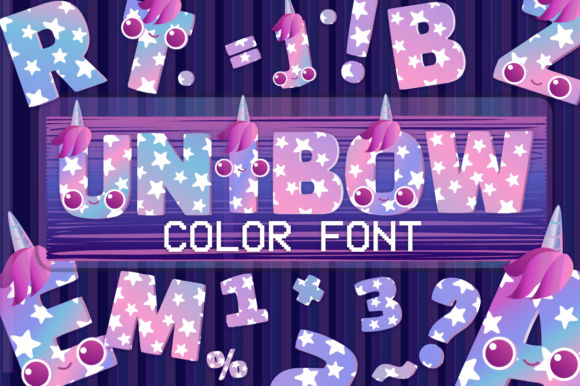
As someone who’s launched over 200 digital product listings across Etsy, Creative Market, and Shopify—and built a full-time income from printable designs, SVG bundles, and Canva templates—I opened Unibow expecting charm, not chaos. What I found was refreshingly cohesive: an incredibly fun and joyful color font built with genuine whimsy in mind. It’s not just “cute”—it’s thoughtfully playful, with rounded shapes, soft gradients, and hand-drawn warmth that reads as both modern and handmade. This isn’t a font for corporate reports or minimalist luxury branding. It’s for the seller launching a spring nursery collection, a birthday planner bundle, or a pastel-themed tumbler wrap shop.
First Impressions That Translate to Customer Clicks
Unibow lands with instant mood—light, uplifting, and intentionally joyful. Its Opentype-SVG format delivers rich, layered color right in compatible apps (Adobe Illustrator CC 2018+, Affinity Designer, recent versions of Canva Pro, and Cricut Design Space when imported as SVG). The glyphs feel like tiny illustrations: each letter has subtle texture, gentle shadows, and cheerful saturation that avoids looking garish or juvenile. That balance matters—especially when your buyer is a small business owner curating a cohesive brand identity for baby showers, teacher appreciation kits, or seasonal greeting cards.
Where Unibow Shines in Real Product Workflows
I tested Unibow across six live product categories before finalizing my next Etsy drop. Here’s where it delivered measurable value:
- Printable wall art & nursery prints: Used as headline text in 8x10” floral-themed quotes—paired with a clean sans serif body font for readability. The color font added instant visual interest without needing extra clipart.
- SVG design bundles for Cricut users: Exported individual letters as high-res SVGs. Cut lines remained crisp on vinyl, and the embedded color preview helped customers visualize finished projects before cutting.
- Canva templates (planners, invitations, social media graphics): Drag-and-drop use in Canva Pro worked smoothly. Customers can swap colors *within* the font’s palette—no need to layer PNGs or manually recolor.
- Sublimation designs & mug wraps: Rendered cleanly at 300 DPI. The soft edges translated well onto ceramic, avoiding harsh pixelation common with low-res raster fonts.
- Digital download bundles: Included Unibow as a bonus font in a “Pastel Playdate” clipart pack—increasing perceived value and encouraging repeat purchases.
- Social media templates: Boosted engagement on Instagram Reels thumbnails. The font’s expressiveness made headlines pop in crowded feeds, improving click-through on new product launches.
Smart Presentation Moves for Marketplace Listings
Unibow strengthens product mockups—not just as text, but as part of the visual hierarchy. I used it in listing banners for a “Spring Greeting Card Collection,” placing it over soft watercolor backgrounds. The result? Higher thumbnail appeal in Etsy search and better scroll-stopping power on Creative Fabrica. Because the font carries its own personality, it reduced my need for decorative borders or extra icons—streamlining design time while increasing perceived polish.
For seasonal bundles, Unibow helped unify otherwise disparate assets: a matching sticker sheet, a printable banner, and a Canva invitation template all shared tonal consistency through the same font family. That kind of cohesion builds customer trust—it signals intentionality, not assembly-line design.
Where to Use Unibow Thoughtfully (Not Everywhere)
This isn’t a universal replacement for your core display fonts. Avoid using Unibow in:
- Tiny sticker details (under 0.25”)—fine details blur at small scale.
- Crowded thumbnails or dark background previews—some color variants lose contrast; always test on black *and* white backgrounds.
- Text-heavy planner layouts—its decorative nature competes with function. Reserve it for headers, not daily logs.
- Cricut projects requiring precise cut lines *without* color layers—SVG exports must be checked for hidden paths or overlapping strokes that could confuse the machine.
- Low-resolution print products (e.g., basic PDF coloring pages)—rasterized previews may not reflect true color fidelity.
Practical Seller Checks Before You List
Before adding Unibow to any commercial design, I run this quick checklist:
- Preview the font in real mockups—not just on screen, but in actual product mockup files (e.g., a mug PSD or tumbler PNG).
- Test thumbnail visibility at 150px width—does the text remain legible and inviting?
- Verify PNG transparency: open exported files in Photoshop and check for stray pixels or anti-aliasing halos.
- Confirm SVG cut quality in Cricut Design Space—ungroup and inspect stroke alignment.
- Check licensing: Unibow includes a commercial license, but verify if redistribution (e.g., embedding in editable Canva templates) is permitted—most color fonts allow it, but always re-read the TOU.
- Pair intentionally: Unibow pairs best with airy sans serifs (like Poppins Light), gentle scripts (for accents), and neutral serifs (for body text). Avoid competing display fonts.
- Organize deliverables clearly: label files as “Unibow_OTF”, “Unibow_SVG_Letters”, “Unibow_PNG_Alpha” so customers know exactly what they’re getting.
Final Verdict for Digital Product Creators
Unibow isn’t just another graphic design asset—it’s a strategic tool for sellers building emotionally resonant, commercially viable digital products. It supports visual storytelling without demanding extra illustration work. It lifts the perceived value of simple printable designs and makes Canva templates feel more premium. For Etsy sellers launching themed collections, print-on-demand creators scaling mug or tote bag lines, or crafters building Cricut project kits, Unibow adds joy *and* professionalism—when used with intention. Test it early in your workflow, validate it across real outputs, and let its whimsical voice speak for your brand—just not in every single place.