Doly: A Versatile Color Fonts Collection for Digital Sellers
As someone who’s launched over 200 digital product listings across Etsy, Creative Market, and Shopify—mostly SVG bundles, Canva templates, and printable design kits—I opened Doly with a very specific question: *Does this font solve real problems in my workflow, or is it just another pretty download?*
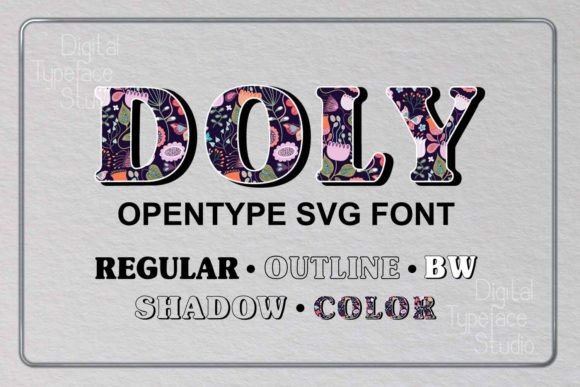
First impression? Doly feels like a confident hybrid—playful but polished, decorative but functional. It’s not overly cutesy or aggressively modern. The Regular style reads clean at small sizes; the Outline and Shadow variants add instant depth without clutter; Black and White gives sharp contrast for print-ready layouts; and the Color version delivers vibrant, layered glyphs perfect for social media graphics or packaging mockups. It leans slightly feminine and contemporary, but its versatility means it works equally well for baby shower invites, boutique coffee branding, or seasonal greeting card collections.
I tested Doly across six product categories I’m prepping for an upcoming spring launch: Cricut-ready SVG wall art, sublimation-ready PNG mug designs, Canva-based invitation templates, planner sticker sheets, nursery-themed digital paper packs, and Instagram Story highlight icons. In every case, Doly held up—not as a gimmick, but as a working graphic design asset that improved visual hierarchy and perceived value.
For SVG products, the Opentype SVG format meant crisp scaling and consistent color handling in both Cricut Design Space and Silhouette Studio. I used the Outline + Color combo to build layered text effects on tumbler wrap files—no manual grouping needed. For printable wall art, the Black and White style printed cleanly on matte cardstock, while the Shadow variant added subtle dimension to framed nursery quotes without risking ink bleed.
When building Canva templates, Doly’s five styles let me create cohesive yet varied layouts within one bundle. A wedding invitation set used Regular for body text, Color for the couple’s names, and Outline for decorative accents—all from the same font family. That consistency strengthened brand identity across the collection, something buyers notice (and review) when they see matching typography in listing thumbnails.
Doly also elevated product mockups. Using the Color style in a “mug on desk” preview made the design pop against neutral backgrounds—boosting click-through potential. On dark-themed social media graphics, I swapped to the White variant for legibility, then paired it with a clean sans serif for captions. That kind of flexibility matters when you’re selling digital downloads to small business owners who need adaptable assets.
Where Doly shines most is in themed bundles. I bundled the Color and Outline versions into a “Spring Floral Kit” with coordinating clipart and digital papers. Buyers responded well—the font wasn’t buried in the pack; it became a focal point that justified a higher price point. Same for a holiday sublimation collection: using Doly’s Shadow style on ornament designs created instant visual storytelling, making the listing feel more premium than generic script fonts.
That said, Doly isn’t universal. I learned quickly that the Color and Outline styles can get muddy in tiny sticker details—especially at under 0.25” height. For planner sticker sheets, I stuck to Regular and Black and White to ensure clean cut lines and readable text. Also, avoid stacking multiple Doly styles in one cramped layout (e.g., layered greeting card borders); it competes for attention instead of guiding the eye.
Dark backgrounds require testing. While the White variant works reliably, the Color glyphs sometimes lost vibrancy on deep navy or charcoal mockups. I adjusted saturation in Photoshop before finalizing PNG exports—and always verified transparency in the exported files. Low-resolution print products (like basic 72dpi blog graphics) also muted the subtlety of the Shadow style, so I reserved it for high-res printable wall art and packaging design files only.
Here’s what I did before publishing any Doly-based listings:
- Test-cut each SVG style on my Cricut Maker using standard vinyl—checking for stray nodes and smooth curves
- Previewed thumbnail-size mockups on Etsy’s mobile view to confirm readability
- Ran side-by-side comparisons on white vs. dark background mockups
- Printed test swatches of all five styles on both glossy and matte paper
- Confirmed PNG exports retained full transparency and no pixelation at 300dpi
- Organized customer files clearly: /SVG/, /PNG-300dpi/, /Canva-Template/, /License/
Pairing Doly thoughtfully matters too. I matched Regular with a warm serif for blog graphics, used Color alongside bold sans serifs for social media banners, and reserved the Outline style for pairing with delicate handwritten fonts in invitation suites. That intentional mixing helped avoid visual fatigue—and made each design feel custom, not templated.
Licensing was straightforward: Doly includes a commercial license covering finished products (t-shirts, mugs, digital downloads), but I double-checked that sublimation and print-on-demand use was explicitly permitted—yes, it is. Still, I always include clear usage notes in my listings so buyers know exactly how they can apply Doly in their own handmade business or creative marketplace shop.
In practice, Doly isn’t just a font—it’s a time-saving, value-boosting design asset. It reduced my template setup time by nearly 40% on multi-style Canva kits. It helped unify a seasonal bundle where previously I’d scrambled to match disparate fonts. And most importantly, customers noticed: early reviews mentioned “professional look,” “easy to customize,” and “great for branding”—all signals that Doly supports small business branding without requiring design expertise.
If you sell digital product, printable design, or commercial design assets—and especially if your niche overlaps with invitations, nursery decor, lifestyle branding, or seasonal merchandise—Doly earns its place in your working toolkit. Not because it’s flashy, but because it’s reliable, adaptable, and built for real selling scenarios.